


Introduction
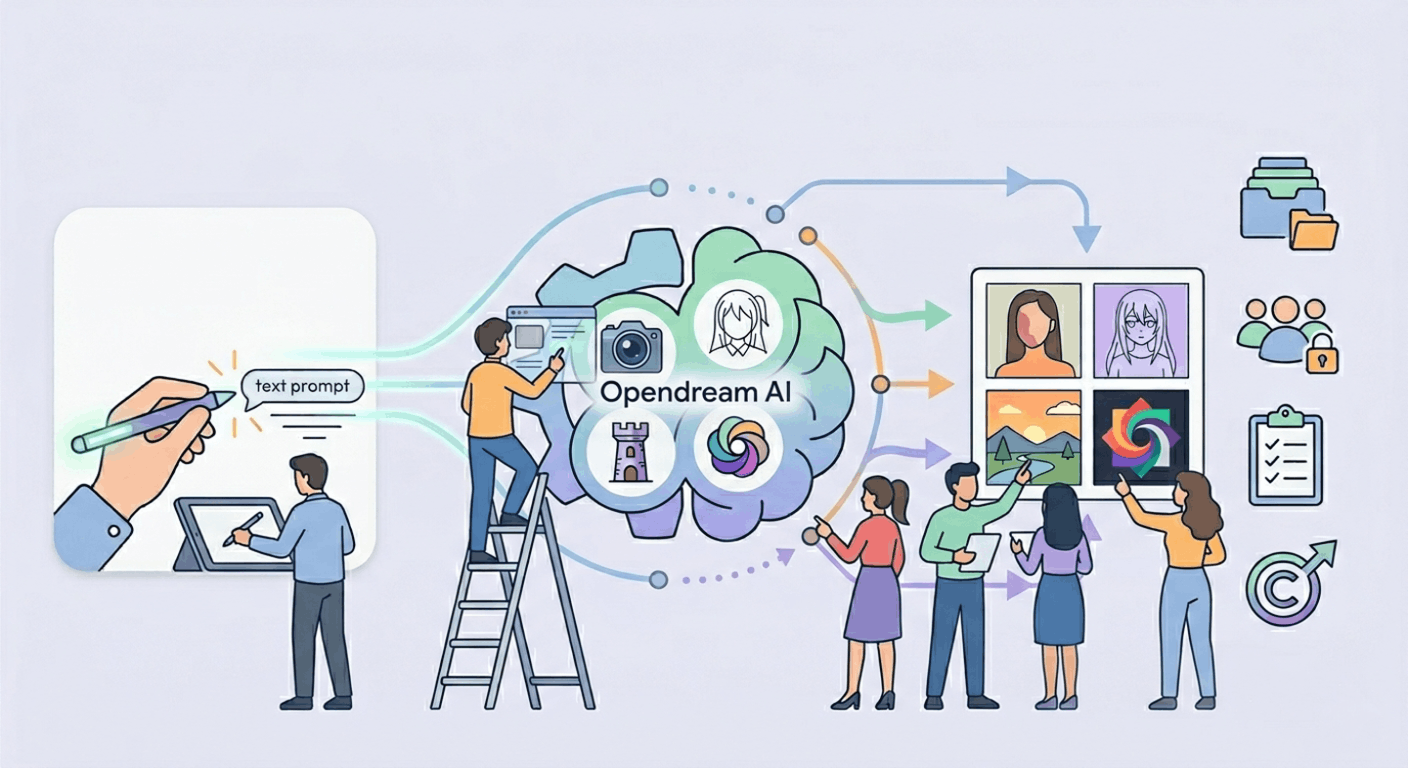
Opendream AI is an AI-powered image generation platform that creates high-quality digital artwork from simple text prompts within seconds. The platform uses advanced AI models like Stable Diffusion and Dreamlike variants to generate realistic, anime, fantasy, and abstract images. Opendream AI is mainly used by creators, designers, marketers, businesses, and beginners looking for fast AI art creation tools. Its browser-based accessibility, editing features, customizable templates, and commercial usage rights have made it popular in the AI image generation industry.
What is Opendream AI?
Opendream AI is a web-based AI image generation platform that converts text prompts into high-quality digital artwork automatically. Users enter a text description, select an AI model or style, and the platform generates images within seconds. It supports multiple visual styles, including photorealistic art, anime, fantasy, abstract visuals, and concept art. Opendream AI combines AI image generation, editing tools, customizable templates, and project management features in one platform, making it useful for both personal creativity and professional content creation.
How Opendream AI Works
Opendream AI works using advanced generative AI models trained on large image datasets. The AI system analyzes text prompts and creates images based on objects, colors, artistic styles, lighting, and scene composition described by the user. The platform supports multiple AI engines such as Stable Diffusion and Dreamlike variants, allowing users to experiment with different creative outputs. Images are usually generated within seconds, depending on the selected model, server load, and subscription plan.
Main AI Models Used by Opendream AI
Opendream AI offers multiple AI image generation models designed for different creative styles and visual outputs. These AI models help users create photorealistic images, anime artwork, fantasy illustrations, abstract visuals, and concept designs. Each model is optimized for specific artistic requirements, allowing creators to experiment with different image styles directly inside the platform. The availability of multiple AI engines makes Opendream AI suitable for artists, marketers, designers, and content creators looking for flexible AI-powered image generation tools.
Dreamlike Photoreal 2.0
Dreamlike Photoreal 2.0 is focused on generating realistic and highly detailed digital images. This model is commonly used for realistic portraits, cinematic scenes, fashion visuals, and professional-quality artwork. It improves lighting, textures, and facial details to create lifelike image outputs.
Dreamlike Anime 1.0
Dreamlike Anime 1.0 is optimized for anime-style image creation and manga-inspired artwork. It is mainly used for stylized character designs, animated visuals, fantasy anime scenes, and colorful digital illustrations.
Stable Diffusion 2.1
Stable Diffusion 2.1 is a versatile AI image model that supports multiple creative categories. It can generate fantasy art, abstract visuals, concept illustrations, realistic graphics, and experimental digital designs based on user prompts.
Deliberate Model
The Deliberate model is designed for artistic experimentation and highly detailed digital paintings. It is commonly used for creative visual effects, advanced compositions, fantasy scenes, and professional digital artwork requiring stronger artistic styling.
Key Features of Opendream AI
Opendream AI includes several advanced features designed for creators, businesses, marketers, educators, and professional designers. The platform combines AI image generation, editing tools, project management, customizable templates, and browser-based accessibility in one system. These features help users create, edit, organize, and manage AI-generated visuals efficiently for both personal and commercial use.
Short Summary Table
| AI Model | Main Purpose | Best For |
| Dreamlike Photoreal 2.0 | Realistic image generation | Portraits and cinematic artwork |
| Dreamlike Anime 1.0 | Anime-style visuals | Manga and character art |
| Stable Diffusion 2.1 | Multi-style image creation | Fantasy and concept illustrations |
| Deliberate Model | Artistic experimentation | Detailed digital paintings |
Key Features of Opendream AI
Opendream AI provides multiple AI-powered tools and creative features designed for image generation, editing, and project management. The platform is built for creators, marketers, designers, businesses, educators, and beginners who need fast AI-generated visuals for different projects. Its combination of multiple AI models, customizable templates, editing tools, and commercial usage rights makes it a complete AI art generation platform. Opendream AI also supports browser-based access and project organization for easier workflow management.
Multiple AI Models for Diverse Styles
Opendream AI supports multiple AI models that generate different artistic styles, including photorealistic visuals, anime artwork, fantasy scenes, abstract graphics, and concept illustrations. This flexibility allows users to experiment with different creative outputs from a single platform.
- Supports realistic, anime, fantasy, and abstract styles
- Uses multiple AI engines for varied outputs
- Suitable for different creative and professional projects
Extensive Customizable Templates
The platform offers hundreds of ready-made templates for content creation and marketing purposes. These templates help users create social media graphics, banners, thumbnails, concept art, and product mockups faster.
- Templates available for multiple use cases
- Helps speed up content creation workflows
- Useful for beginners and professional designers
Lightning-Fast Image Generation
Opendream AI generates images within seconds using advanced AI processing systems. Paid subscribers can also create multiple images simultaneously for faster experimentation and productivity.
- Fast AI image generation system
- Supports parallel image generation on paid plans
- Improves workflow efficiency for creators
Commercial Usage Rights
All AI-generated images created on Opendream AI are copyright-free for personal and commercial usage. Users can legally use generated visuals for websites, advertisements, branding, and marketing campaigns.
- Commercial rights are included with the generated images
- Suitable for business and marketing use
- No watermark restrictions on generated artwork
Advanced Image Editing Tools
Opendream AI includes several built-in image editing tools for improving and refining generated visuals directly on the platform. These tools reduce the need for external editing software.
- Supports image upscaling and quality enhancement
- Includes in-painting and background removal tools
- Allows iterative image refinement and editing
Beginner-Friendly Interface
The platform is designed with a simple interface suitable for both beginners and advanced users. Features like saved prompts, organized galleries, and easy controls improve accessibility.
- Easy-to-use dashboard and navigation
- Supports saved prompts and artwork collections
- Suitable for users with no design experience
Cross-Platform Accessibility
Opendream AI works fully inside web browsers without software installation. Users can access the platform on desktop and mobile devices from anywhere.
- Browser-based AI image generation platform
- Works on desktop and mobile devices
- No software download required
Privacy and Project Management
Users can choose to keep generated images private or share them publicly. The platform also includes project management features for organizing artwork and creative collections efficiently.
- Private and public image sharing options
- Supports artwork organization and storage
- Helps manage multiple creative projects
Best Uses of Opendream AI
Opendream AI is widely used across different industries because of its fast AI image generation, flexible AI models, and editing features. The platform supports professional and personal creative workflows.
Content Creation
Content creators use Opendream AI for thumbnails, blog images, YouTube banners, and social media visuals.
- Useful for blogs and YouTube content
- Helps create engaging social media graphics
- Supports fast thumbnail generation
Marketing and Advertising
Businesses and marketers use the platform to generate promotional visuals, branding materials, and ad creatives quickly.
- Creates marketing graphics efficiently
- Useful for advertisements and branding
- Helps improve visual content production speed
Education and Learning
Teachers and students use AI-generated visuals for educational presentations, assignments, and learning materials.
- Supports educational content creation
- Useful for presentations and projects
- Helps create visual learning materials
Digital Art and Design
Artists and designers use Opendream AI for fantasy artwork, concept illustrations, experimental visuals, and digital painting projects.
- Useful for concept art creation
- Supports fantasy and artistic illustrations
- Helps generate experimental digital designs
Opendream AI Pricing
Opendream AI offers both free and paid subscription plans for different user requirements. The plans mainly differ in credits, AI model access, speed, and advanced features.
Free Plan
The free plan provides limited daily credits and access to selected AI models for beginners testing the platform.
- Costs $0 per month
- Includes limited daily credits
- Supports selected AI models only
Core Plan
The Core Plan provides more credits, faster image generation, and access to all AI models available on the platform.
- Costs around $12 per month
- Includes 3,000 image generation credits
- Supports faster and parallel generation
Pro Plan
The Pro Plan is designed for professional creators who need higher usage limits and advanced workflow features.
- Costs around $24 per month
- Includes 12,000 credits and priority support
- Supports advanced creative and batch generation features
Short Summary Table
| Feature Category | Main Purpose | Key Benefit |
| Multiple AI Models | Generate different art styles | Flexible creative outputs |
| Customizable Templates | Faster content creation | Saves design time |
| Image Editing Tools | Improve generated visuals | Better image quality |
| Commercial Rights | Business and marketing usage | Copyright-free images |
| Cross-Platform Access | Browser-based accessibility | Use on desktop and mobile |
| Pricing Plans | Flexible subscription options | Suitable for beginners and professionals |
Opendream AI Pricing Plans
Opendream AI offers free and paid subscription plans designed for beginners, creators, marketers, and professional designers. The pricing plans mainly differ in daily credits, AI model access, image generation speed, and advanced workflow features. Users can choose a plan based on their creative requirements and usage level. The platform also supports scalable AI image generation for both casual and professional content creation.
Opendream AI Free Plan
The Free Plan is designed for beginners and casual users who want to test the platform before purchasing a subscription. It includes limited daily credits and supports selected AI models for basic image generation tasks.
The free version mainly supports Dreamlike Photoreal 2.0 and Dreamlike Anime 1.0 models. Users can generate AI images with limited usage restrictions and basic generation speed.
Opendream AI Core Plan
The Core Plan is created for regular creators and marketers who require more image generation credits and faster processing speeds. It provides access to all AI models available on the platform.
The plan also supports parallel image generation, allowing users to create multiple outputs simultaneously for faster creative workflows and experimentation.
Opendream AI Pro Plan
The Pro Plan is targeted at professional creators, businesses, and advanced users who need higher credit limits and premium workflow tools. It includes advanced features and priority support for improved productivity.
The plan supports batch image generation, higher usage limits, faster rendering performance, and advanced AI creative features suitable for commercial projects and large-scale workflows.
Opendream AI vs Competitors
Opendream AI competes with several AI image generation platforms, including Midjourney, DreamStudio, and OpenAI. The platform stands out because of its browser-based accessibility, multiple AI models, editing tools, and free plan availability. Unlike some competitors, Opendream AI combines image generation, editing, templates, and project management features inside one platform.
Comparison with Midjourney
Midjourney mainly focuses on artistic and stylized AI-generated visuals through Discord-based access. Opendream AI provides browser-based usability and supports more editing tools directly inside the platform.
Midjourney does not currently offer a free plan, while Opendream AI includes limited free daily credits for beginners testing the service.
Comparison with DALL·E 3
DALL·E 3 focuses on high-quality conceptual image generation and prompt understanding. Opendream AI offers multiple AI models and additional editing features for broader creative flexibility.
Opendream AI also supports anime, fantasy, and experimental styles more extensively through multiple integrated AI engines.
Comparison with DreamStudio
DreamStudio provides Stable Diffusion-based image generation with flexible customization features. Opendream AI expands this experience by offering multiple AI models, built-in editing tools, templates, and project organization systems.
The platform is also designed to simplify workflows for beginners and professional users alike.
Opendream AI Alternatives
Several AI image generation platforms are considered alternatives to Opendream AI because they provide similar AI-powered creative tools and image generation features. Each platform differs in AI models, accessibility, pricing, workflows, and editing capabilities.
Popular alternatives include Midjourney, DreamStudio, and Imagine.art, Synthesia, and CGDream.ai.
Advantages of Opendream AI
Opendream AI provides several advantages for creators, marketers, businesses, educators, and digital artists because of its flexible AI image generation system and editing capabilities. The platform combines multiple creative tools inside one browser-based environment.
Its main advantages include fast AI image generation, support for multiple artistic styles, commercial usage rights, advanced editing tools, beginner-friendly controls, customizable templates, and cross-platform accessibility.
Limitations of Opendream AI
Although Opendream AI offers many powerful features, the platform also has some limitations that users should consider before choosing a subscription plan. Some advanced functions and higher generation limits require paid access.
The free plan includes limited daily credits, image quality may vary depending on prompts, and certain artistic styles require prompt experimentation for better outputs. Some advanced workflow features are also restricted to premium plans.
Is Opendream AI Safe to Use?
Opendream AI is generally considered safe for AI image generation and creative use when used responsibly. The platform allows users to create copyright-free images for personal and commercial projects.
Users should still avoid uploading sensitive personal information, copyrighted material without permission, or inappropriate content. Businesses are also advised to review AI-generated visuals carefully before publishing them commercially or using them in professional branding campaigns.
Short Summary Table
| Category | Main Information | Key Benefit |
| Free Plan | Limited credits and basic models | Good for beginners |
| Core Plan | More credits and faster generation | Better workflow efficiency |
| Pro Plan | Advanced tools and priority support | Suitable for professionals |
| Competitors | Midjourney, DALL·E 3, DreamStudio | Multiple platform options |
| Advantages | Fast generation and editing tools | Flexible AI creativity |
| Limitations | Limited free credits and prompt dependency | Requires experimentation |
| Safety | Commercially usable AI images | Safe with responsible usage |
Future of Opendream AI
The future of Opendream AI is expected to grow alongside the expanding AI image generation industry. The platform may introduce more advanced AI models, faster image rendering systems, and improved editing tools for professional creators. Future updates could also include better customization controls, stronger automation features, and higher image realism. As demand for AI-generated content increases, Opendream AI is likely to continue improving its creative and commercial capabilities.
FAQs About Opendream AI
What is Opendream AI used for?
Opendream AI is mainly used for generating AI images from text prompts. Users can create realistic artwork, anime visuals, fantasy illustrations, thumbnails, social media graphics, and concept art. The platform is popular among creators, marketers, designers, and businesses. It is also used for commercial content creation and digital art projects.
Is Opendream AI free to use?
Yes, Opendream AI offers a free plan with limited daily credits for image generation. The free version supports selected AI models like Dreamlike Photoreal 2.0 and Dreamlike Anime 1.0. Users can test the platform before upgrading to paid plans. Paid subscriptions provide more credits, faster rendering, and advanced features.
Can I use Opendream AI images commercially?
Yes, images generated on Opendream AI are generally copyright-free for commercial and personal use. Businesses can use the generated visuals for marketing campaigns, websites, advertisements, and branding projects. However, users should still review generated content carefully before publishing. Responsible usage is recommended for professional work.
Which AI models are available on Opendream AI?
Opendream AI supports multiple AI models, including Dreamlike Photoreal 2.0, Dreamlike Anime 1.0, Stable Diffusion 2.1, and the Deliberate model. These models help create different artistic styles such as photorealistic images, anime artwork, fantasy scenes, and abstract illustrations. Users can switch between models depending on their creative needs.
Is Opendream AI safe for beginners?
Yes, Opendream AI is designed with a beginner-friendly interface that simplifies AI image generation. The platform provides simple controls, templates, saved prompts, and organized galleries for easier navigation. Beginners can create AI-generated visuals without advanced design experience. The browser-based system also makes the platform easy to access from different devices.