



The digital economy moves too fast for static software. For years, businesses relied on traditional automation to handle repetitive tasks. We built spreadsheets, integrated basic webhooks, and deployed software scripts to speed up operations. But the moment an unexpected variable appears, like a messy PDF, an emotional customer email, or a minor interface change, traditional systems stop working.
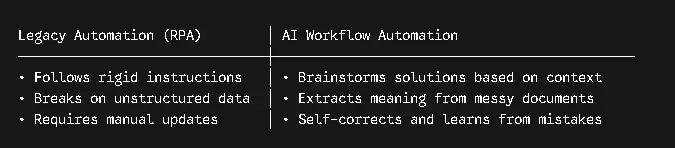
Legacy systems cannot think. They follow strict instructions without understanding context.
AI Workflow Automation Platforms change this completely. By combining the processing power of Large Language Models with modern data routing, these platforms help businesses move past fragile scripts and build truly adaptive operational systems. This guide covers how these ecosystems work, how their architecture is structured, and how to use them to scale your business operations.
What is an AI Workflow Automation Platform?
An AI Workflow Automation Platform is an enterprise software environment that uses artificial intelligence, machine learning, natural language processing, and autonomous agents to design, manage, and improve business operations from start to finish.
Unlike older software that depends entirely on absolute rules, AI platforms handle real-world messiness. They do not just move data from one field to another. They read the data, understand what it means, choose the best path forward, and learn from every decision they make.
Understanding the Change from Traditional Tools
To understand why this matters, consider how standard automation handles a simple task like managing an invoice email.
A traditional program can download an attachment and upload it to a specific folder. However, if the vendor changes the invoice design or writes a note in the email body requesting a partial payment due to damaged shipping crates, the program fails. It either skips the note entirely or freezes because the layout changed.
An AI platform handles the situation differently. It reads the email text, notes the vendor’s unusual request, checks the shipping logs to verify the damaged crates, and drafts a contextual reply for your accounting team to review. It handles ambiguity by using reasoning instead of just following fixed code.
Core Pillars of Modern AI Workflow Automation Architecture
To understand how AI workflow automation platforms process enterprise workloads, it helps to view them through their architectural building blocks. State-of-the-art enterprise deployments generally balance three core layers:
1. The Cognitive Backbone (LLMs & RAG)
At the foundation of every modern automation platform is an advanced language model layer. These systems use modern reasoning engines like GPT-5.4, Claude 4.6 Opus, or Gemini 3.1 Pro to process instructions.
To keep these models grounded, enterprises use Retrieval-Augmented Generation (RAG). Instead of letting the AI guess answers based on public internet data, RAG links the model directly to your secure company databases, knowledge bases, and document repositories. When a workflow triggers, the system pulls the exact internal facts required for that specific task. This approach eliminates AI hallucinations and keeps your confidential data safe.
2. Multi-Agent Orchestration
Instead of using one massive AI model to run an entire business process, modern platforms divide the workload among specialized AI agents.
Think of these agents like a digital workforce. In a customer onboarding process, you might have:
- A Parsing Agent that reads identification documents and forms.
- A Validation Agent that verifies information against public registries.
- A Risk Assessment Agent that flags unusual accounts based on internal guidelines.
An orchestration engine coordinates these agents, passing data smoothly between them and ensuring they work toward the same objective.
3. The Human-in-the-Loop (HITL) Guardrail
While AI handles the heavy lifting, high-maturity systems embed safety invariants and human oversight checkpoints. If an anomaly breaches established safety definitions or falls below a specific confidence threshold, the workflow seamlessly hands off to a human operator, preventing silent failures or unvetted automations.
The Core Features to Look For in AI Workflow Automation Platforms
If you are evaluating an AI workflow automation platform for your organization, look for these essential functionalities:
- Zero-Code/Low-Code Drag-and-Drop Builders: Business analysts, not just software developers, should be able to orchestrate or modify workflows using natural language prompts or visual boards.
- Native Tool Use (Model Context Protocol): The platform must seamlessly read and write data across your tech stack—such as your CRM, ERP, and communication hubs (e.g., Slack, email)—using adaptive API integrations.
- Continuous Learning Loops: The software should monitor active operations and leverage feedback-driven rewards (reinforcement learning) to improve its processing accuracy and latency over time.
- Enterprise-Grade Safety Compliance: Built-in safeguards that check how multiple AI agents interact, ensuring they don’t combine to create security or compliance vulnerabilities.
The Technical AI Workflow Automation Under the Hood
To trace exactly how data moves through this architectural engine, let us break down the underlying mechanics step by step:
1. Ingestion Protocol:
A vendor uploads a non-standardized invoice PDF to a shared enterprise intake folder, triggering the automated pipeline.
2. Cognitive Parsing Execution:
The Parsing Agent initializes, using a high-reasoning model like Claude 4.6 Opus through a Model Context Protocol (MCP) link. It extracts structural data points (individual line items, subtotals, tax rates, bank routing details) regardless of the document’s design.
3. Unified Protocol Connectivity:
The platform passes this structured data payload down to the MCP Server. Instead of relying on fragile custom scripts, the MCP server allows the platform to communicate across three distinct systems natively and simultaneously: your core ERP software, your active Purchase Order (PO) database, and your external vendor registry.
4. Three-Way Reconciliation:
The Validation Agent takes over, running a rigorous reconciliation sweep. It checks if the invoice total matches the active purchase order, confirms that the line item quantities match actual warehouse shipping records, and verifies that the vendor’s bank details match your corporate registry.
5. Gateway Routing Engine:
- If everything aligns perfectly and the confidence score exceeds 95%, the Payment Agent updates your financial software and prepares the automated settlement loop.
- If any detail conflicts (such as an unapproved $15 shipping fee surcharge), the compliance gateway stops the transaction. It routes the invoice to the Human-in-the-Loop Dashboard, flagging the exact line-item conflict so an accounting manager can resolve it in seconds.
The Top 5 AI Workflow Automation Platforms Dominating the Industry
To help you choose the right infrastructure for your deployment, here is an in-depth breakdown of the top 5 enterprise-grade AI automation and orchestration tools available today, along with their core strengths and limitations.
1. LangGraph by LangChain
LangGraph is currently the industry standard for developer teams who have outgrown simple, linear chains and need to build complex multi-agent networks. Unlike traditional frameworks, it is built specifically to handle stateful, cyclical reasoning. This means agents can loop back, self-correct, and re-evaluate data until they get the job done right.
- Core Strength: Exceptional control over complex agent architectures. It uses graph-based state machines where every node represents an action or an agent, allowing developers to create custom guardrails and prevent autonomous systems from going off track.
- Best For: Advanced engineering teams building critical enterprise workflows like automated software testing, compliance checking, and complex financial analysis, where precision and custom coding are mandatory.
- Honest Limitation: High barrier to entry. It requires heavy Python or TypeScript expertise, so non-technical business teams cannot build or modify workflows here. App Store – Apple
2. CrewAI
CrewAI shifts the focus from technical plumbing to human-like organization. It operates on a brilliant Crew, Agent, Task mental model. You define specific roles like SEO Strategist, Copywriter, or Fact-Checker, give them precise goals, equip them with custom tools, and let them collaborate autonomously like a high-performing digital workforce.
- Core Strength: Rapid prototyping and a highly intuitive setup. CrewAI excels at collaborative, creative, and research-driven operations where multiple personas need to pass data back and forth to achieve a high-quality output.
- Best For: Marketing agencies, content operations, and operations teams looking to automate multi-step qualitative processes like brand research, competitor analysis, and multi-channel content generation pipelines.
- Honest Limitation: Can become token-heavy and experience performance drift if agent roles are too broad or if tasks are poorly defined.
3. Microsoft Azure AI Foundry
For enterprises deeply embedded in the Microsoft stack, Azure AI Foundry integrates the capabilities of AutoGen and Semantic Kernel. It provides a highly scalable, secure, and compliant multi-agent orchestration framework. It allows developers to build event-driven conversational agents that can easily utilize corporate data.
- Core Strength: Enterprise-grade security and ecosystem alignment. It offers deep integration with Microsoft 365, Teams, and Azure native security controls like Entra ID role-based access, meaning sensitive data never risks leaving the company’s secure cloud perimeter.
- Best For: IT departments and enterprise architects looking to deploy background automation fleets, internal data retrieval assistants, and complex customer support systems at scale.
- Honest Limitation: Highly opinionated and closely tied to the Microsoft Azure ecosystem, which can lead to vendor lock-in for organizations using multi-cloud strategies.
4. Coworker AI
Coworker AI stands out because it acts as an autonomous digital teammate driven by a proprietary organizational memory layer called OM1. Backed by a 16.5 million dollar funding round, the platform connects to over 25 enterprise applications, including Jira, Slack, GitHub, and Salesforce, to execute complex tasks contextually.
- Core Strength: Deep company context tracking. It monitors over 120 business parameters, enabling it to run context-aware model routing. It dynamically chooses the most cost-effective LLM for a task to deliver up to 5x token efficiency. SourceForge+ 1
- Best For: Scaleups and mid-market companies that need an active AI coworker to monitor pipelines, automatically write code fixes based on Slack alerts, or generate cross-platform workflow automation without heavy engineering setup.
- Honest Limitation: While it offers zero-code agent building, organizations with strictly isolated, completely on-premise legacy databases might struggle to utilize its native cloud-connector features.
5. Zapier
Zapier remains the undisputed king of software integration, now supercharged with native AI Agents and the Model Context Protocol support. It allows non-technical business teams to build automated workflows that tap into an unparalleled ecosystem of over 9,000 different web applications, introducing AI decision points mid-stream.
- Core Strength: Ecosystem coverage and simplicity. With its drag-and-drop builder, anyone can insert an LLM step using OpenAI, Anthropic, or Gemini directly into an existing corporate pipeline, while built-in authentication securely handles data access without exposing API credentials.
- Best For: Small-to-medium businesses and operations leads who want to inject fast, reliable AI decision-making into their existing software stack without waiting for dedicated IT development cycles.
- Honest Limitation: It operates primarily on linear, rule-based logic. It struggles with deeply autonomous multi-agent simulation environments where agents must dynamically choose their own path forward based on unpredictable data.
Real-World Use Cases and Impact
Enterprise studies confirm that deploying self-learning, agentic automation platforms delivers measurable advantages over traditional software, often driving substantial performance gains over baseline metrics.
| Industry Domain | Legacy Process Pain Point | AI Automation Transformation | Measurable Outcome |
| IT Operations & Cyber SOC | Manual review of thousands of noisy server logs and system alerts. | AI agents autonomously orchestrate log parsing, filter out systemic noise, and summarize incidents. | 40% reduction in incident analysis time; up to 99% reduction in manual review volume. |
| Healthcare Administration | Labor-intensive, slow reporting and manual classification of clinical safety events. | Locally deployed LLMs with secure RAG pipelines categorize incidents and extract actionable insights. | Accelerated triage and trend tracking, reduced documentation workloads, and lower human error rates. |
| Customer Service Operations | Rigid chatbots failing on complex, multi-topic user requests. | Compositionally guarded multi-agent webs coordinate to resolve custom, multi-variable customer accounts. | Safer automated resolutions with millions in projected net annual value for enterprise deployments. |
Final Thoughts
Making the move to an AI workflow automation platform isn’t just about adopting a new piece of software; it requires a fundamental shift in how you think about your organization’s operations. The true value of this technology does not come from chasing pure algorithmic trends or trying to eliminate human involvement from your business. It comes from building clear operational guardrails, focusing on high-quality data preparation, and creating seamless cooperation between your human team and your digital agents.
When you automate tedious, repetitive cognitive tasks, you do not replace your workforce. Instead, you unlock their true potential. You give your team members the freedom to focus on high-level strategy, creative problem solving, and genuine human relationships—the actual building blocks of long-term corporate growth.
FAQ’s
Q1: How does an AI workflow automation platform differ from traditional RPA?
Traditional Robotic Process Automation (RPA) mimics human clicks and relies entirely on strict, rules-based logic. If a user interface changes slightly or text format shifts, RPA breaks. An AI workflow automation platform uses contextual intelligence like LLMs and NLP to navigate unexpected changes, interpret unstructured text, and make complex decisions dynamically.
Q2: Is our data safe when using an AI workflow automation platform?
Enterprise-grade platforms are built with strict data governance boundaries. By isolating workflows within private cloud networks, utilizing local or fine-tuned open-source models, and leveraging Retrieval-Augmented Generation (RAG), your proprietary business data remains secure and is never used to train public foundational models.
Q3: Do these platforms require extensive coding knowledge to set up?
No. Most modern platforms feature a no-code or low-code interface. They leverage visual drag-and-drop builders and natural language programming, meaning business managers and operational leads can build and fine-tune automation agents without relying heavily on dedicated software engineering departments.
Q4: What is the role of “Human-in-the-Loop” (HITL) in AI automation?
HITL is a critical safety guardrail. When an AI agent encounters a scenario where its processing confidence drops below a specific percentage threshold, or if a step involves high-risk actions like processing high-value payments, the system holds the action and passes it to a human supervisor for approval, ensuring absolute accuracy.